> ## Documentation Index
> Fetch the complete documentation index at: https://bunnynet-cb9733c2-support-migration.mintlify.site/llms.txt
> Use this file to discover all available pages before exploring further.
# Request Coalescing
> Combine multiple simultaneous requests to the same resource into a single origin request.
Request Coalescing combines multiple simultaneous requests for the same uncached resource into a single request to your origin. Instead of forwarding every request individually, Bunny ties subsequent requests to the initial one and streams response bytes simultaneously to all waiting clients as soon as they arrive.
## How it works
1. Multiple users request the same uncached file at the same time
2. Bunny sends a single request to your origin
3. As the response streams back, it's simultaneously delivered to all waiting clients
4. The file is cached for future requests
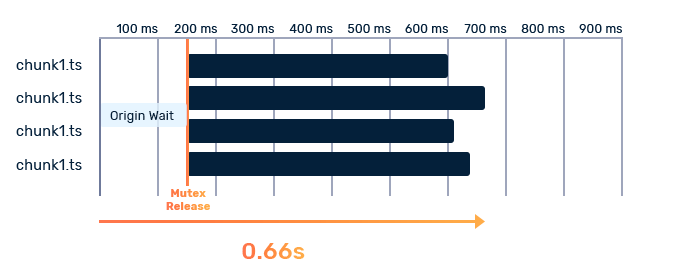 This happens in real-time with near-zero added latency—waiting requests receive data as it arrives, not after the full response is cached.
## When to use it
Request Coalescing is ideal for:
* **Live streaming**: Thousands of viewers requesting the same video segments simultaneously
* **High-traffic public APIs**: Cacheable responses served to many users at once
* **Traffic spikes**: Sudden bursts of requests for the same resources
Request Coalescing reduces origin load and can improve cache hit rates during
high-concurrency scenarios.
## Enabling Request Coalescing
1. Go to your Pull Zone in the [dashboard](https://dash.bunny.net)
2. Navigate to **Caching**
3. Enable **Request Coalescing**
## Per-request control with Edge Rules
To override the zone-level setting for specific paths or request conditions, create an Edge Rule with the **Enable Request Coalescing** or **Disable Request Coalescing** action
1. Go to **Edge Rules** in your Pull Zone settings and click **Add Rule**
2. Select **Enable Request Coalescing** or **Disable Request Coalescing**
3. Add conditions to match the requests you want to target, such as a URL path pattern, file extension, or request header
A common pattern is to leave Request Coalescing off at the zone level and
enable it only on paths serving publicly cacheable content, keeping
authenticated routes safely excluded.
## Important limitations
**Do not use Request Coalescing with user-specific dynamic content.** If your
origin returns different responses based on authentication or user context,
enabling this feature could cause personal information to be shared between
users making simultaneous requests.
Request Coalescing triggers on any uncached request—both static and dynamic resources. Only enable it for Pull Zones serving publicly cacheable content.
### Not a guarantee of single requests
Request Coalescing does not guarantee only one request ever reaches your
origin. It only combines requests that arrive **simultaneously** for the same
resource.
Your origin may still receive multiple requests if:
* Requests arrive sequentially rather than at the same time
* Requests come from different CDN PoPs (coalescing runs independently on each edge node)
This happens in real-time with near-zero added latency—waiting requests receive data as it arrives, not after the full response is cached.
## When to use it
Request Coalescing is ideal for:
* **Live streaming**: Thousands of viewers requesting the same video segments simultaneously
* **High-traffic public APIs**: Cacheable responses served to many users at once
* **Traffic spikes**: Sudden bursts of requests for the same resources
Request Coalescing reduces origin load and can improve cache hit rates during
high-concurrency scenarios.
## Enabling Request Coalescing
1. Go to your Pull Zone in the [dashboard](https://dash.bunny.net)
2. Navigate to **Caching**
3. Enable **Request Coalescing**
## Per-request control with Edge Rules
To override the zone-level setting for specific paths or request conditions, create an Edge Rule with the **Enable Request Coalescing** or **Disable Request Coalescing** action
1. Go to **Edge Rules** in your Pull Zone settings and click **Add Rule**
2. Select **Enable Request Coalescing** or **Disable Request Coalescing**
3. Add conditions to match the requests you want to target, such as a URL path pattern, file extension, or request header
A common pattern is to leave Request Coalescing off at the zone level and
enable it only on paths serving publicly cacheable content, keeping
authenticated routes safely excluded.
## Important limitations
**Do not use Request Coalescing with user-specific dynamic content.** If your
origin returns different responses based on authentication or user context,
enabling this feature could cause personal information to be shared between
users making simultaneous requests.
Request Coalescing triggers on any uncached request—both static and dynamic resources. Only enable it for Pull Zones serving publicly cacheable content.
### Not a guarantee of single requests
Request Coalescing does not guarantee only one request ever reaches your
origin. It only combines requests that arrive **simultaneously** for the same
resource.
Your origin may still receive multiple requests if:
* Requests arrive sequentially rather than at the same time
* Requests come from different CDN PoPs (coalescing runs independently on each edge node)