> ## Documentation Index
> Fetch the complete documentation index at: https://bunnynet-cb9733c2-support-migration.mintlify.site/llms.txt
> Use this file to discover all available pages before exploring further.
# Purge Cache
> Clear cached content from your Pull Zone to serve fresh files from your origin.
Purge cached files when you need visitors to see updated content immediately rather than waiting for cache expiration.
You can purge the entire Pull Zone, or purge only files matching a specific tag.
Purging large zones puts temporary load on your origin server while content is
re-cached. Performance may decrease briefly until edge nodes repopulate.
Bunny CDN does not monitor your origin for file changes. Once a file is cached, it stays cached until its `Cache-Control` lifetime expires or it's evicted to make room for more popular content. To reflect a change immediately, purge the cache or serve the file under a new query string (such as `?v=2`).
## Dashboard
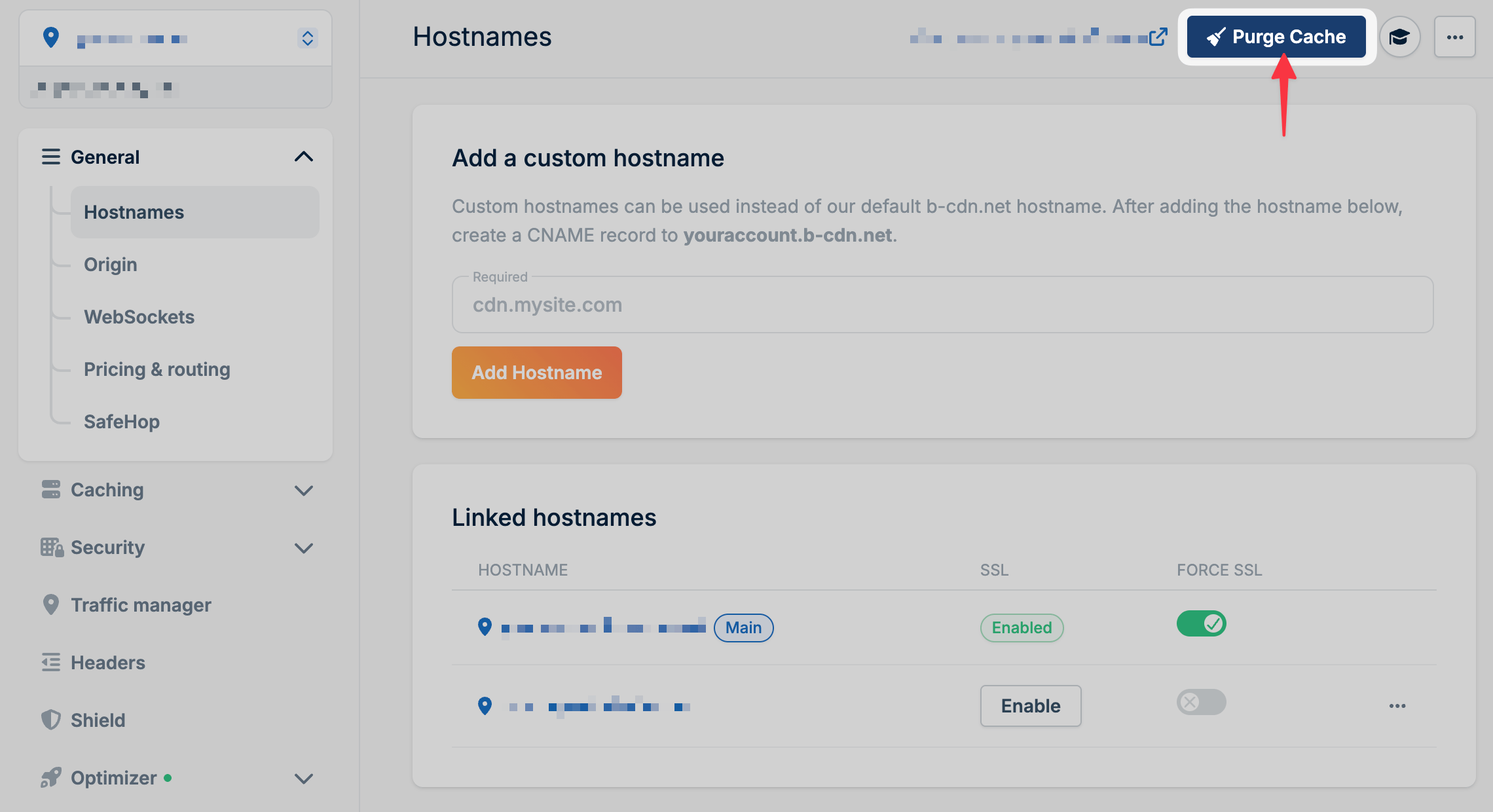
Go to your Pull Zone in the [dashboard](https://dash.bunny.net) and click **Purge Cache** in the top right corner.
 Leave the search tag empty to purge the entire Pull Zone. If you enter a tag, only files with a matching `CDN-Tag` header are removed. The rest of your cache stays intact.
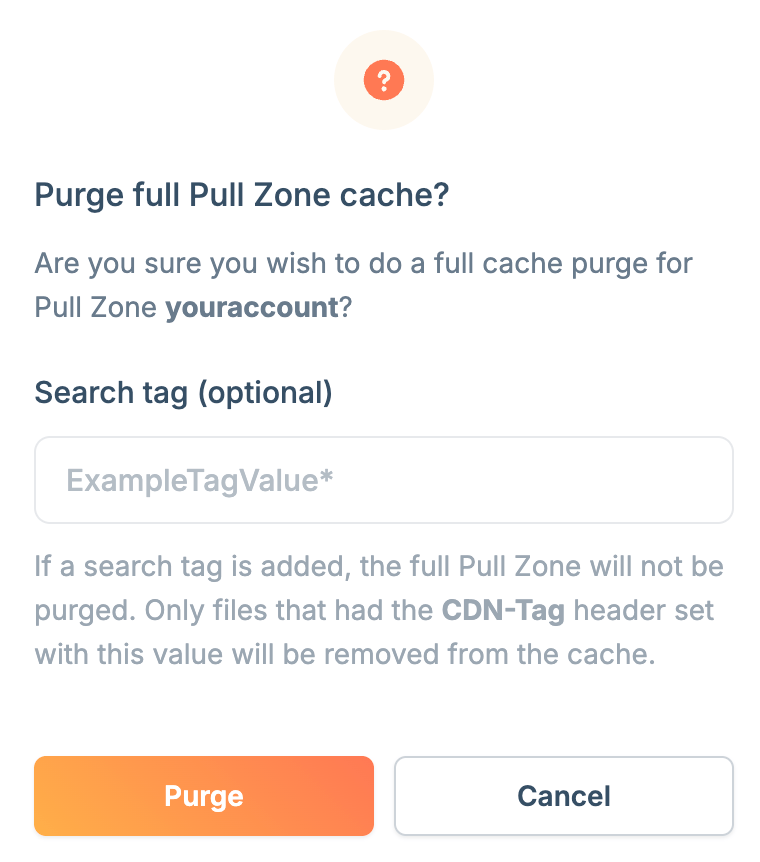 Click **Purge** to clear the cache.
## API
You can also purge cache programmatically. See the [Core API reference](/api-reference/core) for full details.
### Full Pull Zone purge
```bash theme={null}
curl -X POST "https://api.bunny.net/pullzone/{id}/purgeCache" \
-H "AccessKey: YOUR_API_KEY"
```
### Purge by tag
Tag responses from your origin with the `CDN-Tag` header, then purge all files matching that tag:
```bash theme={null}
curl -X POST "https://api.bunny.net/pullzone/{id}/purgeCache" \
-H "AccessKey: YOUR_API_KEY" \
-H "Content-Type: application/json" \
-d '{"CacheTag": "product-123"}'
```
Useful for invalidating all assets related to a specific product, user, or category without clearing your entire cache.
`CDN-Tag` header values are limited to 1024 bytes. Longer values are truncated.
To purge a specific URL across all pull zones, use the Purge URL endpoint in the [Core API](/api-reference/core).
## Rate limits
To ensure platform stability, the Purge API is protected by rate limits. These limits are designed to keep normal purge workflows fast while preventing abuse or accidental overload.
Purge requests are rate-limited using a token bucket mechanism:
* Limits are applied per account
* Limits are applied per purge type
* Each purge item consumes 1 token
* Tokens refill steadily over time
If a request exceeds the available rate limit, the API returns a `429 Too Many Requests` response with guidance on when to retry.
### Purge types
Purge requests are classified into one of the following types:
**Exact Purge**
A single URL without wildcards where the path does not end with `/`.
```
https://example.com/image.png
```
**Prefix (Wildcard) Purge**
The URL contains a `*`, or the path ends with `*` or `/`.
```
https://example.com/images/*
https://example.com/assets/
```
### Default rate limits
| Purge Type | Burst Capacity | Refill Rate | Approx. Sustained Rate |
| ---------- | -------------- | -------------- | ---------------------- |
| Exact | 120 tokens | 5 tokens/sec | \~300 per minute |
| Prefix | 20 tokens | 0.5 tokens/sec | \~30 per minute |
If your workload requires higher purge throughput, please [contact
support](https://dash.bunny.net/support) to discuss custom rate limits.
## Perma-Cache behavior
If you're using [Perma-Cache](/cdn/perma-cache):
* **Full zone purge**: Clears CDN cache but Perma-Cache switches to a new directory (manually delete the old folder if needed)
* **Tag-based purging**: Not supported with Perma-Cache enabled
Click **Purge** to clear the cache.
## API
You can also purge cache programmatically. See the [Core API reference](/api-reference/core) for full details.
### Full Pull Zone purge
```bash theme={null}
curl -X POST "https://api.bunny.net/pullzone/{id}/purgeCache" \
-H "AccessKey: YOUR_API_KEY"
```
### Purge by tag
Tag responses from your origin with the `CDN-Tag` header, then purge all files matching that tag:
```bash theme={null}
curl -X POST "https://api.bunny.net/pullzone/{id}/purgeCache" \
-H "AccessKey: YOUR_API_KEY" \
-H "Content-Type: application/json" \
-d '{"CacheTag": "product-123"}'
```
Useful for invalidating all assets related to a specific product, user, or category without clearing your entire cache.
`CDN-Tag` header values are limited to 1024 bytes. Longer values are truncated.
To purge a specific URL across all pull zones, use the Purge URL endpoint in the [Core API](/api-reference/core).
## Rate limits
To ensure platform stability, the Purge API is protected by rate limits. These limits are designed to keep normal purge workflows fast while preventing abuse or accidental overload.
Purge requests are rate-limited using a token bucket mechanism:
* Limits are applied per account
* Limits are applied per purge type
* Each purge item consumes 1 token
* Tokens refill steadily over time
If a request exceeds the available rate limit, the API returns a `429 Too Many Requests` response with guidance on when to retry.
### Purge types
Purge requests are classified into one of the following types:
**Exact Purge**
A single URL without wildcards where the path does not end with `/`.
```
https://example.com/image.png
```
**Prefix (Wildcard) Purge**
The URL contains a `*`, or the path ends with `*` or `/`.
```
https://example.com/images/*
https://example.com/assets/
```
### Default rate limits
| Purge Type | Burst Capacity | Refill Rate | Approx. Sustained Rate |
| ---------- | -------------- | -------------- | ---------------------- |
| Exact | 120 tokens | 5 tokens/sec | \~300 per minute |
| Prefix | 20 tokens | 0.5 tokens/sec | \~30 per minute |
If your workload requires higher purge throughput, please [contact
support](https://dash.bunny.net/support) to discuss custom rate limits.
## Perma-Cache behavior
If you're using [Perma-Cache](/cdn/perma-cache):
* **Full zone purge**: Clears CDN cache but Perma-Cache switches to a new directory (manually delete the old folder if needed)
* **Tag-based purging**: Not supported with Perma-Cache enabled